Database
Squid は複数 database とシームレスに統合する capability を提供し、data への容易な access を可能にします。各 database は異なる authorization と access control で構成でき、公開したい data のみを user が access できるようにします。
Squid の database connector は、power と simplicity の両面で優れています。database connector を追加すると、streamlined SDK を使用して data に access・interaction できます。
Squid は、無制限に customize できる security function、自然言語で data に関する ad-hoc question を尋ねる Query with AI、別の database connector からの result も join できる fine-grained data query など、多数の database feature を提供します。
Database への接続
- Squid Console の Connectors tab に移動します。
- "Available Connectors" をクリックし、database type を選択します。
- 必要な connection detail を入力し、connection を test します。
- "Next" をクリックし、表示された schema が正確であることを確認します。必要に応じて、Squid で使用する予定のない table を削除します(これらは後でいつでも追加し直せます)。
- "Save" をクリックして connector を確定します。
Squid's IP address
To prevent denial-of-service attacks, brute force password attacks, and other forms of malicious activity, some providers recommend restricting your network to allow access only from specific IP addresses. This procedure is commonly known as allowlisting, and it limits access to your resources by only accepting connections from a specific list of endpoints.
Refer to your resource provider to determine if you need to add Squid's IP addresses to your access list. If allowlisting is required, you can find Squid's IP addresses on the application overview page of the Squid Console (located in the Cloud Provider section).
Query with AI
Query with AI を使用すると、自然言語で data に関する question を尋ねられます。Squid AI は、answer を取得するために実行された database query と step とともに、自然言語 format で answer を返します。SQL または NoSQL query を記述せずに、data を explore したり ad-hoc question を尋ねたりできます。Query with AI は database connector の Schema tab、または Squid の AI Agent Studio 内にあります。
Query with AI で実行できる内容について詳しくは、documentationを参照してください。
接続済み Database の使用
client から data に access するには、connector 作成時に指定した value である connector ID を使用します。connector ID は Squid Console の connectors page で確認できます。
await squid
  .collection('COLLECTION_NAME', 'YOUR_CONNECTOR_ID')
  .query()
  .eq('field', 'value')
  .snapshots()
  .subscribe((data) => {
    // Do something with your data
  });
fullstack application で database connector を操作する方法について詳しくは、documentationを参照してください。
Database の保護
database connector を保護するには、database security decorator である @secureDatabase または @secureCollection を使用する function を 1 つ以上記述します。以下は、user が document の userId field を変更できないようにするために backend project に追加できる、より複雑な security rule の例です。
export class ExampleService extends SquidService {
  @secureCollection('table_name', 'update', 'CONNECTOR_ID')
  secureUpdate(context: MutationContext): boolean {
    // If the user is not authenticated, the update is not allowed.
    const auth = this.getUserAuth();
    if (!auth) return false;

    // If the userId has changed, the update is not allowed.
    const { after, before } = context.beforeAndAfterDocs;
    if (after.userId !== before.userId) return false;

    // The update is only allowed if the user making the request
    // matches the user being updated.
    return after.userId !== auth.userId;
  }
}
database connector の保護について詳しくは、data の保護に関する documentationを参照してください。
Database Schema
database を Squid に接続すると、database 内の既存 data schema に基づいて schema が自動生成されます。schema を表示するには、Squid Console で database connector に移動し、... button をクリックして dropdown menu から Schema を選択します。
この interface を使用して schema structure の確認、schema change、rule validation の管理を行い、data の正確性を確保します。
Collection と Field の理解
collection は database の主な organization unit であり、underlying structure は database connector type によって異なります。SQL database では collection は_table_を表し、NoSQL database では collection は_document collection_を表します。
collection は connector 内で unique name により識別されます。collection は 1 つ以上の document で構成され、document は SQL database では_row_、NoSQL database では_document_を表します。document には、異なる data element を示す 1 つ以上の field が含まれます。collection 内の各 field は特定の attribute set で特徴付けられ、streamlined data management と connector を可能にします。
collection と field の一般的な structure および attribute を詳しく見てみましょう。
Collections:
Name: related row または document set の grouping と reference に役立つ、connector 内の unique identifier。
Documents:
ID: collection 内の unique identifier。ID は random にできますが、user ID やその他の重要な data point にすることもできます。
Fields:
Name: field の name。insert、update、query の際に document field name と一致する必要があります。Type: field が属する data category を指定します。string、number、boolean、date、map、array などの type を含みます。選択した type は追加の validation rule を決定する場合があります。String: minimum および maximum length を設定できます。Number: minimum および maximum value を設定できます。
Primary Key: field が collection 内の unique identifier として機能するかを示し、record の識別に役立ちます。Required: field への data entry が mandatory かを示します。Default Value: field に preset value を割り当てます。
Extra Field を許可する
一部の database connector、特に NoSQL data structure を持つものは dynamic schema をサポートします。dynamic schema は data を追加するたびに change するため、schema を事前定義する必要はありません。data の insert、update、remove 時に、database は schema を自動的に構築します。dynamic schema がサポートされているかは、database connector の documentation を参照してください。
dynamic schema をサポートする connector では、extra field は default で許可されています。collection の schema change を防ぐには、Schema に移動して目的の collection を選択し、Allow extra fields を toggle off にします。disable 後、extra field を含む document の insert または update は拒否されます。
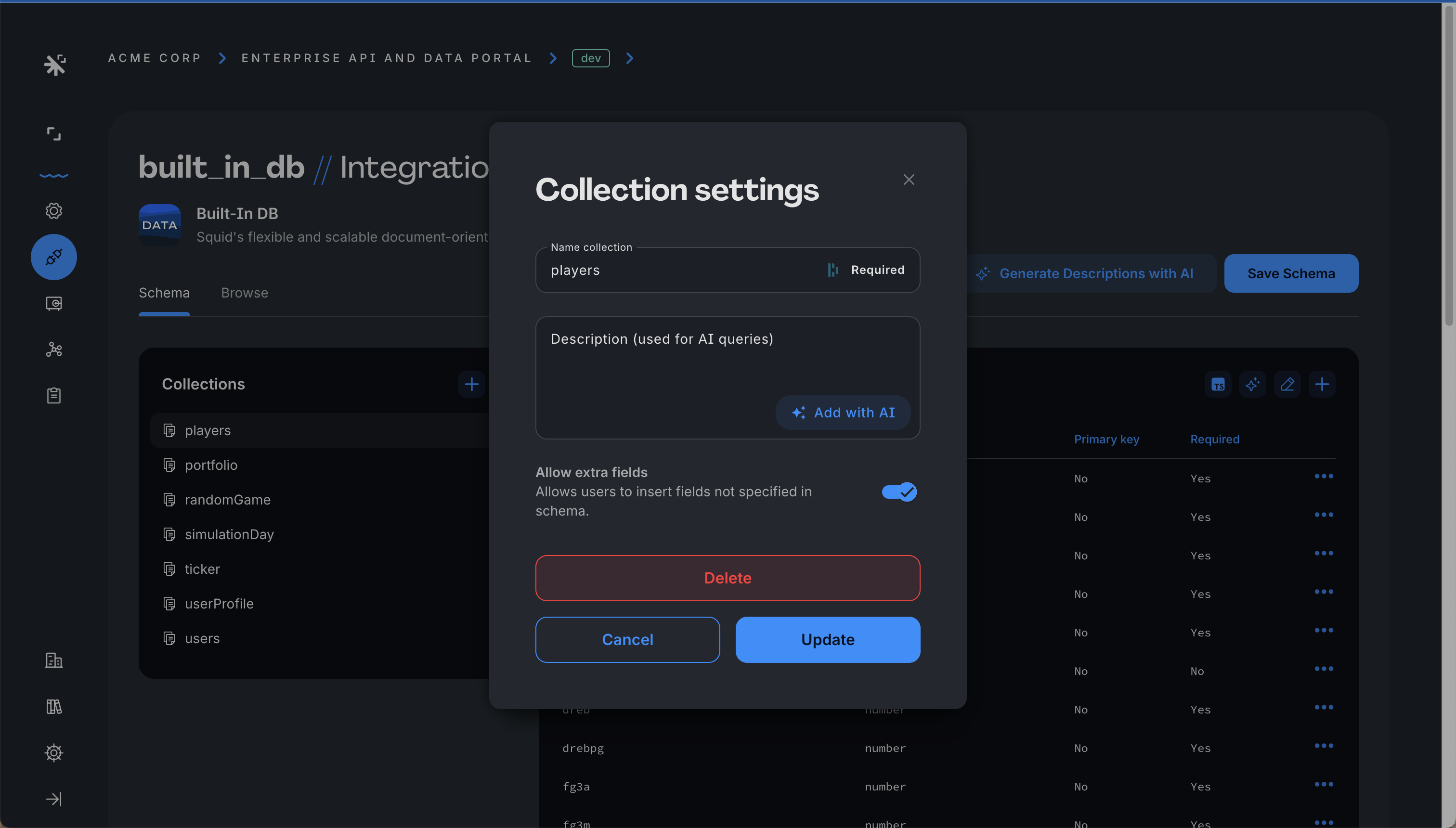
以前は不明だった field が、Rediscover schema をクリックした後に known schema の一部になると、Allow extra fields が disable されていても、新しい field はシームレスに受け入れられます。