HTTP API
Squid を任意の HTTP API に接続し、request と response を map できます。これにより Squid Client SDK を使用して access できます。
Squid は 2 種類の HTTP API をサポートします。
- REST API - CRUD operation の実行に HTTP protocol を使用する API
- OpenAPI API - API の定義に OpenAPI specification を使用する API
どちらの API type も、利用可能な API connector の list にある HTTP API connector を使用して追加できます。
メリット
Squid Client SDK は API access と schema autodiscovery を容易にし、security を強化するために Squid を通じて API call を route することで、development process を簡略化します。authorized client のみに API access を制限するため、individual endpoint に security rule を適用できます。
さらに、この setup では authentication secret などの sensitive information を API request に安全に inject できます。Squid は request を行う client からこれらの secret を隠し、API の integrity を確保して security を強化します。
ユースケース
- client-side access が制限されている API への access。
- IP-based access restriction のある API への access。
- API で client を authenticate するための secret の request への inject。
- 各 endpoint に security rule を提供し、authorized client のみが API に access できるようにする。
HTTP API Connector を作成する
HTTP connector を作成するには、次の情報を指定する必要があります。
- Connector ID - 任意の ID。簡潔で意味のあるものにすることを推奨します
- OpenAPI specification URL - OpenAPI specification file の URL。通常は
.yamlまたは.jsonで終わります。これは OpenAPI API に接続する場合にのみ必要です。この field を空欄にした場合、connector の追加後に API schema file を upload することもできます。
connection information を入力したら、Next button をクリックして続行します。
API Connector の使用
connector を作成したら、Squid Client SDK を使用して HTTP API に access します。次の例は、追加 option を含む POST request を示しています。
const response = await squid.api().request(
  'YOUR_INTEGRATION_ID',
  'YOUR_ENDPOINT_ID',
  { user_name: 'newUser1 ' }, // request body
  {
    headers: { api_key: YOUR_API_KEY }, // optional headers
    queryParams: { new_user: true }, // optional query parameters
    pathParams: { 'subscriber-group': 42 }, // optional path parameters
  },
  'post' // request method
);
Autodiscovery と Schema の定義
OpenAPI specification endpoint では、Squid Console が schema を自動的に discover するため、configuration process がより正確かつ便利になります。endpoint は tag に基づいて自動的に group 化され、search 可能であるため、長い endpoint list を操作しやすくなります。API が OpenAPI spec を使用していない場合は、console で schema を手動定義できます。
Squid の API connector では、Squid Client SDK を通じた request と response の encoding および decoding に必要な detail を示す schema の作成が必要です。この schema は Squid と RESTful API の間に機能する connection を確立するために不可欠です。
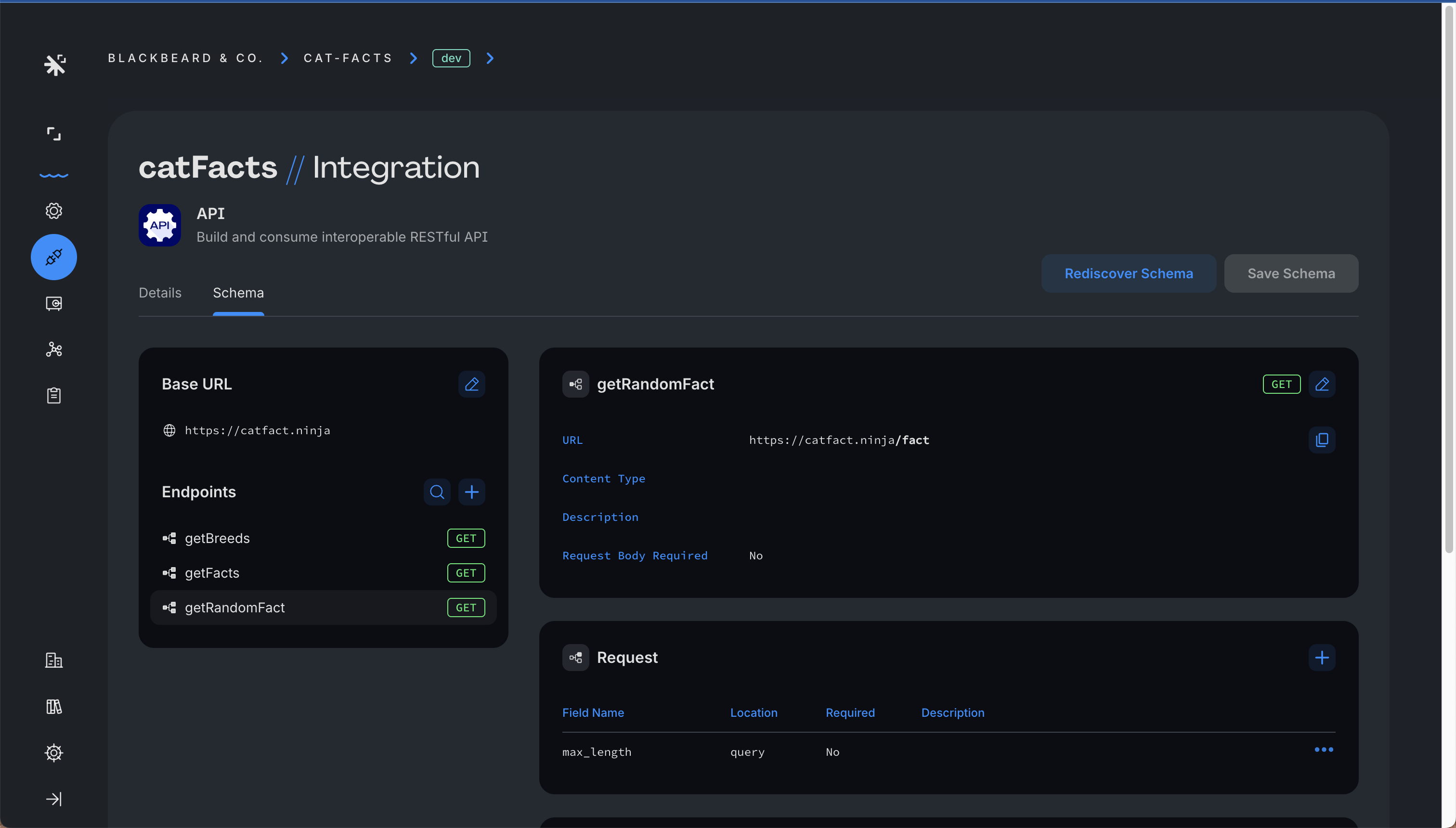
schema は次の element で構成されます。
Base URL
endpoint path を append する base URL。
Endpoints
API 内の異なる access point の collection。各 endpoint では request と response を定義できます。各 endpoint には以下の definition が含まれます。
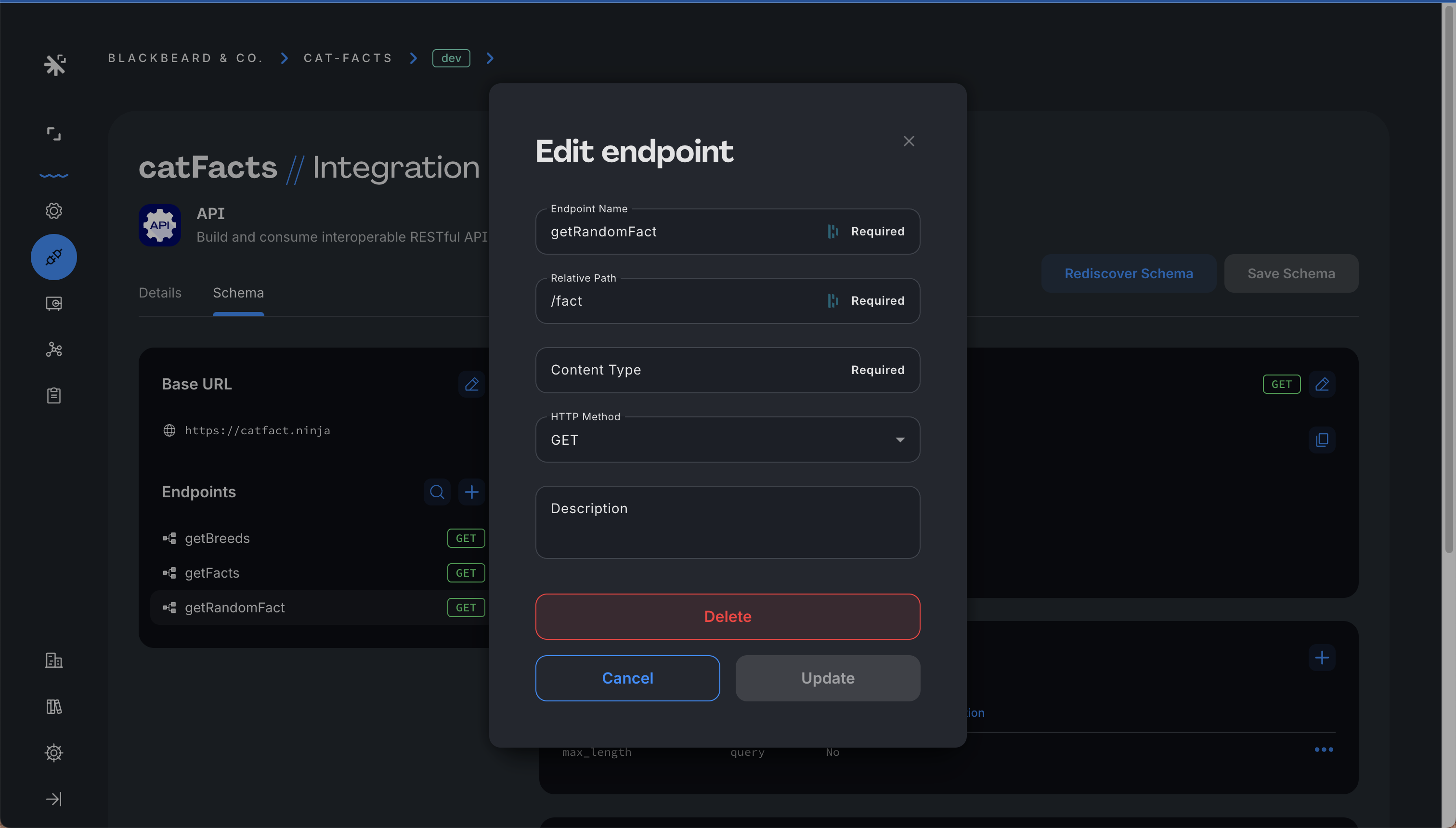
Name
endpoint の unique identifier。
Relative path
base URL に append して完全な endpoint URL を形成する path(request URL の query part も含められます)。path parameter を含める場合、それらを bracket で囲んでください(例: /YOUR_ENDPOINT_ID/{pathParam})。
HTTP method
API call に default で使用する HTTP method(例: GET、POST)を指定します。
Request description
API request element を詳述する field で構成されます。
Response description
API response を詳述する field で構成されます。
以下は Squid Console で endpoint を編集する例です。
Injections
injection は Squid の feature で、predefined value を各 API request に挿入し、API interaction の flexibility と security を強化します。この feature は Squid Console で API schema level に global に、または endpoint ごとに individual に構成できます。
injection を setup するには、次の element を構成します。
Field name
value を inject する field の name を指定します。
Location
request 内の value の配置場所を決定します。現在、HEADER と QUERY の 2 つの option がサポートされています。
Field value
指定 field に inject する実際の value。direct value または pre-configured Squid secret から取得した value を使用できます。
Secret
injection field の value が secret であり、Squid Secret として保存すべきことを示す optional toggle。
YOUR_CONNECTOR_ID という label の endpoint があり、relative path が /YOUR_ENDPOINT_ID?someVar={mySecret}、POST method を使用しているとします。この setup には mySecret という name の injection field が 1 つ構成されており、location は PATH に設定され、my-secret-value が保存された既存の Squid secret を指しています。
次の例は、Squid Client SDK からこの API を call する方法を示します。
const result = await squid.api().request('YOUR_CONNECTOR_ID', 'YOUR_ENDPOINT_ID');
その結果、Squid は次の HTTP request を実行します。
POST /YOUR_ENDPOINT_ID?someVar=my-secret-value
API を MCP Server として公開する
API connector は、AI agent 用の MCP server としても機能します。connector configuration で Expose as MCP Server を toggle すると、Squid は schema の各 endpoint が callable tool となる MCP server を生成します。server code は必要ありません。生成された server を agent に接続する方法については、Exposing an API connector as an MCP serverを参照してください。
Security Rule の要件
Squid Client SDK を使用した endpoint access に security rule を指定する option があります。
HTTP API connector を保護するには、Secure API section を参照してください。
Tutorial
external HTTP API を Squid と統合する完全な example については、Cat Facts API Tutorialを参照してください。