Firebase Authentication
Squid は Firebase Authentication とシームレスに統合し、data の query や update、executable の呼び出しなどの user action を authorize します。
Squid で Firebase Authentication integration を使用するには、まず Firebase app を Squid に接続します。
-
Squid Console に移動します。app と environment(dev または prod)を選択し、Integrations tab をクリックします。
-
Available integrations tab から Firebase Authentication を選択します。
-
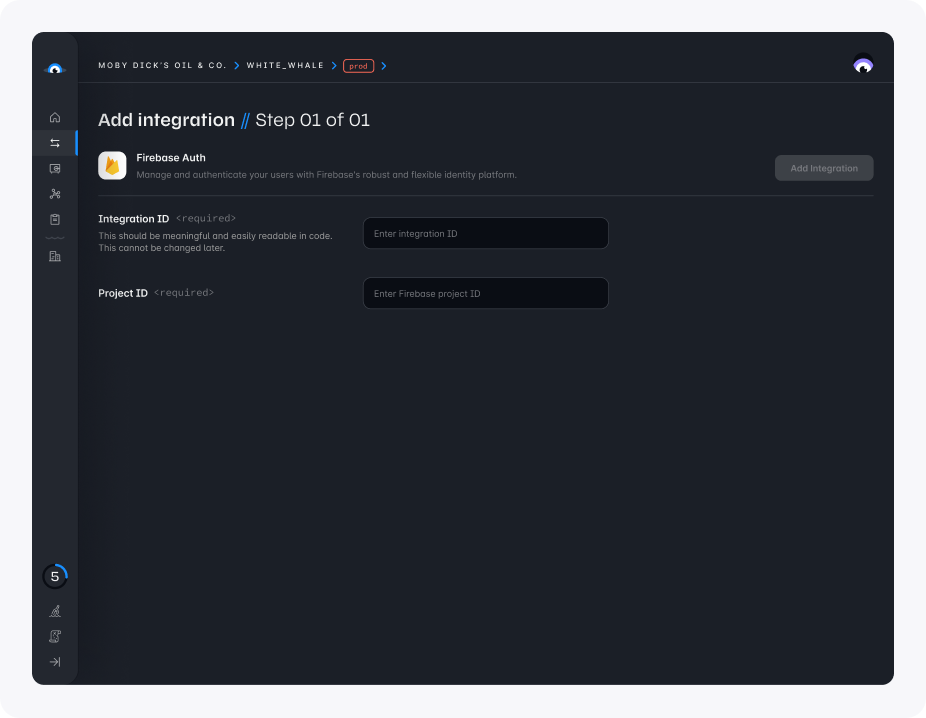
次の detail を入力します。
- Integration ID: 任意の ID を選択できますが、簡潔で意味のあるものにすることをおすすめします
- Project ID: Firebase project の unique identifier です。project ID は Firebase Console で確認できます。
- Add integration をクリックします。
Firebase Authentication integration を追加したら、app で Firebase Authentication を Squid とともに使用する方法について、authentication documentation を確認してください。