Authentication の追加
Squid はさまざまな authentication provider と統合できます。Squid に接続することで、user action を authorize し、project に security を追加できます。
Authentication を使用する理由
ほとんどの application では、user を識別し、各 user が実行できる操作を制御する必要があります。Squid は既存の authentication provider に接続するため、auth system を一から構築せずに user identity を検証し、access control を適用できます。
概要
Squid は token を発行しません。代わりに authentication provider が token を発行し、client がそれを Squid に渡します。Squid は token を validate し、auth detail を backend code で使用可能にします。
Squid は 2 つの authentication method をサポートします。
- Bearer token(user auth): auth provider が user ごとに JWT を発行します。client はすべての Squid request でこの token を送信します。Squid は token を validate し、user detail(user ID、expiration、custom attribute)を抽出します。request を実行する user を識別する必要があるすべての feature に使用します。
- API key(server-to-server auth): user identity なしで access を付与する shared key。backend-to-backend communication、admin script、user identity が不要な automated process に使用します。
サポートされる Provider
Squid は以下の authentication provider をサポートします。
| Provider | 説明 | Docs |
|---|---|---|
| Auth0 | OpenID Connect provider | Auth0 setup |
| AWS Cognito | AWS user pool service | Cognito setup |
| Okta | Enterprise identity platform | Okta setup |
| Keycloak | Open-source identity management | Keycloak setup |
| Firebase Auth | Google Firebase auth | Firebase setup |
| Descope | No-code CIAM platform | Descope setup |
| JWT RSA | Custom RSA-signed JWT | JWT RSA setup |
上記 provider の大部分は OpenID Connect(OIDC)protocol を使用します。これは OAuth 2.0 上に構築された identity layer で、application が user identity を検証し profile information を取得する方法を standardize します。OIDC を理解すると、provider の正しい configuration や token issue の troubleshooting に役立ちます。詳細はこちらを参照してください。
クイックスタート
前提条件
- Squid application(backend と client)
- 上記のサポートされる auth provider のいずれかの account
ステップ 1: Squid Console で Auth Connector を追加する
Squid Console で application に移動し、application overview の Add auth provider をクリックします。使用する connector を選択し、必要な configuration field を入力します。
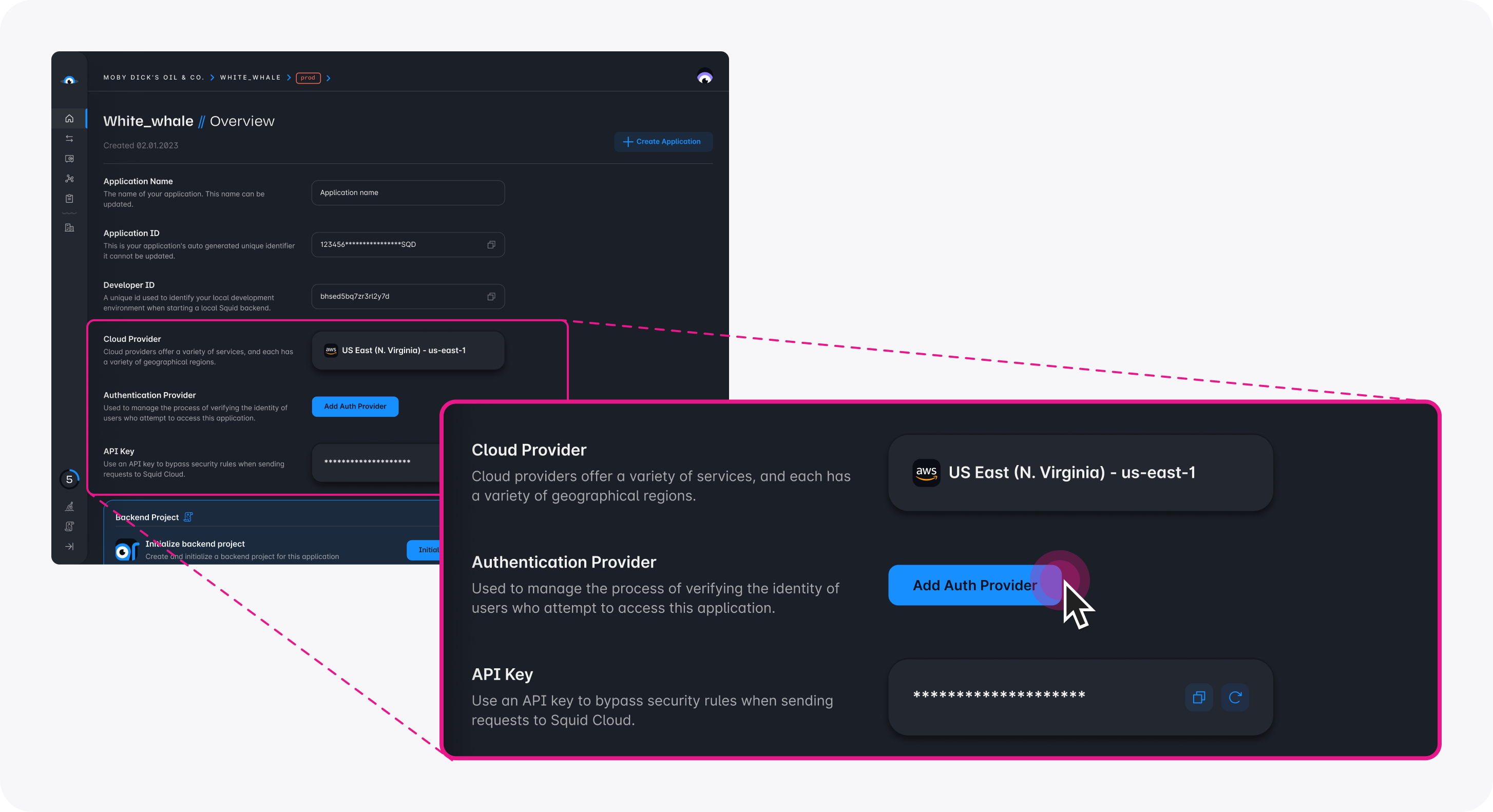
provider 固有の configuration detail については、上記の Supported providers table に link された各 provider page を参照してください。
ステップ 2: Client を構成する
Console で connector を setup した後、すべての request で auth token を送信するよう Squid client を構成します。
import { Squid, SquidAuthProvider } from '@squidcloud/client';

const squid = new Squid({ ... });

const authProvider: SquidAuthProvider = {
  // Must match the connector ID you set in the Squid Console
  integrationId: 'your_auth_connector_id',
  getToken: () => {
    // Return the token from your auth provider (e.g., Auth0, Firebase, Cognito)
    return yourAuthLibrary.getAccessToken();
  },
};

squid.setAuthProvider(authProvider);
ステップ 3: Backend で Auth を使用する
auth provider を構成すると、backend へのすべての request に validate 済み token が含まれます。任意の backend service method で authenticated user の detail に access できます。
import { executable, SquidService } from '@squidcloud/backend';

class MyService extends SquidService {
  @executable()
  getProfile(): { userId: string } | null {
    const userAuth = this.getUserAuth();
    if (!userAuth) {
      return null;
    }
    return { userId: userAuth.userId };
  }
}
Client-side Configuration
SquidAuthProvider interface
SquidAuthProvider interface は、Squid が client から auth token を取得する方法を定義します。
interface SquidAuthProvider {
  /** Must match the connector ID configured in the Squid Console. */
  integrationId: string;

  /**
   * Returns a valid access token, or undefined if there is no active session.
   * Called by Squid every time the client makes a request to the backend.
   * Can be synchronous or asynchronous.
   */
  getToken(): Promise<string | undefined> | string | undefined;
}
integrationId- Squid Console で構成した integration ID と完全に一致する必要があります。getToken()- すべての request で呼び出されます。string、undefined、またはそのいずれかで resolve するPromiseを返せます。function がundefinedを返す場合、request に authorization information は送信されません。
auth provider は、Squid constructor option または setAuthProvider の呼び出しで設定できます。
// Option 1: Set in the constructor
const squid = new Squid({
  appId: 'your_app_id',
  region: 'us-east-1',
  authProvider: {
    integrationId: 'auth0',
    getToken: () => getAccessToken(),
  },
});

// Option 2: Set after initialization
squid.setAuthProvider({
  integrationId: 'auth0',
  getToken: () => getAccessToken(),
});
Token Caching
Squid はすべての request で getToken() を呼び出すため、token を cache し、expiration が近づいたときだけ renew してください。
let cachedToken: string | undefined;
let tokenExpiry = 0;

const authProvider: SquidAuthProvider = {
  integrationId: 'auth0',
  getToken: async () => {
    const now = Date.now();
    // Renew the token 60 seconds before it expires
    if (!cachedToken || now >= tokenExpiry - 60_000) {
      const result = await yourAuthLibrary.getAccessToken();
      cachedToken = result.token;
      tokenExpiry = result.expiresAt;
    }
    return cachedToken;
  },
};
API Key Authentication
API key authentication は、user identity が不要な backend-to-backend communication、admin operation、automated script に使用します。
Squid constructor option を通じて API key を渡します。
import { Squid } from '@squidcloud/client';

const squid = new Squid({
  appId: 'your_app_id',
  region: 'us-east-1',
  apiKey: 'your_api_key',
});
API key authentication は userId を提供しません。個々の user を識別する必要がない場合にのみ使用してください。
Squid API key は、Squid Console の Application tab で確認または再作成できます。
Backend で Auth を使用する
Auth Helper Method
SquidService は、backend code で authentication を操作するために次の method を提供します。
| Method | Returns | 説明 |
|---|---|---|
isAuthenticated() | boolean | request に valid auth(user token または API key)がある場合に true を返します |
assertIsAuthenticated() | void | request が authenticate されていない場合、UNAUTHORIZED を throw します |
getUserAuth() | AuthWithBearer | undefined | request が Bearer token を使用する場合、user auth detail を返します |
getApiKeyAuth() | AuthWithApiKey | undefined | request が API key を使用する場合、API key detail を返します |
Auth Type Shape
request が Bearer token(user auth)を使用する場合、getUserAuth() は AuthWithBearer object を返します。
interface AuthWithBearer {
  type: 'Bearer';
  /** The unique identifier of the authenticated user. */
  userId: string;
  /** The expiration timestamp of the token, in seconds. */
  expiration: number;
  /** Additional attributes associated with the token. */
  attributes: Record<string, any>;
  /** The raw JWT token string, if available. */
  jwt?: string;
}
request が API key を使用する場合、getApiKeyAuth() は AuthWithApiKey object を返します。
interface AuthWithApiKey {
  type: 'ApiKey';
  /** The API key string used for authentication. */
  apiKey: string;
}
Request Context
すべての backend method は、current request に関する information を持つ RunContext object を返す this.context に access できます。
interface RunContext {
  /** Your application ID. */
  appId: string;
  /**
   * The ID of the client that initiated this request. Only available for
   * client-initiated requests (not triggers, schedulers, or webhooks).
   */
  clientId?: string;
  /** The IP address of the client that initiated this request. */
  sourceIp?: string;
  /** The headers of the request. Header keys are lowercase. */
  headers?: Record<string, any>;
}
例: Authenticated Backend Method
import { executable, SquidService } from '@squidcloud/backend';

class UserService extends SquidService {
  @executable()
  getUserDashboard(): { userId: string; attributes: Record<string, any> } {
    // Throws UNAUTHORIZED if no valid auth is present
    this.assertIsAuthenticated();

    const userAuth = this.getUserAuth();
    if (!userAuth) {
      throw new Error('This endpoint requires user authentication, not an API key');
    }

    return {
      userId: userAuth.userId,
      attributes: userAuth.attributes,
    };
  }
}
Auth を Security Rule に接続する
authentication data は、Squid の security decorator(@secureDatabase、@secureCollection など)に直接渡されます。security rule は上記と同じ auth method を使用して、data と API への access を制御します。
たとえば、collection のすべての operation に authentication を要求できます。
import { secureCollection, SquidService } from '@squidcloud/backend';

class SecurityService extends SquidService {
  @secureCollection('users', 'read')
  secureUsersRead(): boolean {
    return this.isAuthenticated();
  }
}
security decorator と pattern の全範囲については、Security rules documentationを参照してください。role-based access pattern については、RBAC documentationを参照してください。
Error Handling
authentication が失敗すると、Squid は 401 UNAUTHORIZED response を返します。一般的な原因は次のとおりです。
- Expired token:
getToken()が返す token が expiration time を過ぎています。Token caching section に示す renewal を伴う token caching を実装してください。 - Mismatched integration ID:
SquidAuthProviderのintegrationIdが Squid Console で構成した integration ID と一致しません。両方の value が完全に一致することを確認してください。 - Missing auth provider setup: auth connector が Squid Console に追加されていないか、誤って構成されています(domain、client ID などが不正)。
- No token returned:
getToken()function がundefinedを返しているため、request に auth information が送信されません。authenticated request を実行する前に、user が signed in していることを確認してください。
authentication issue を debug するには、次を確認します。
- connector が Squid Console で正しく構成されている。
setAuthProviderに渡すintegrationIdが Console の integration ID と完全に一致している。getToken()function が valid で非 expired の token を返している。
ベストプラクティス
- auth provider への不要な round trip を避けるため、
getToken()内で token を cache し、expiration の少し前に renew します。 - resource への access を付与する前の baseline requirement として、security rule では常に
isAuthenticated()を確認します。 - user-facing feature には Bearer token を、backend service または script には API key を使用します。
- database、API、storage、queue を含むすべての entry point を保護します。保護されていない entry point は auth check を bypass します。
- 手動で check・throw するのではなく、明確な error で迅速に failure させるために
assertIsAuthenticated()を使用します。