Query data sources with AI
Ask questions about your database in natural language and get back answers, charts, and the queries used to produce them.
Why Use Query with AI
Your users want answers from your database, but they don't write SQL. The product team wants to know "how many active users are in each region?" without filing a ticket. Your support team wants to find "the most common error message in the last 24 hours" without learning your schema.
Building a natural-language interface to a database means writing your own prompt engineering, schema serialization, query validation, error correction, and result formatting. With Query with AI, the backend handles all of that:
- TypeScript
- Python
const response = await this.squid.ai().executeAiQuery(
  'postgres',
  'How many users signed up last week, broken down by country?',
);

console.log(response.answer); // "1,247 users signed up last week..."
console.log(response.executedQueries); // The actual SQL Squid ran
response = await self.squid.execute_ai_query(
    'postgres',
    'How many users signed up last week, broken down by country?',
)

print(response['answer'])           # "1,247 users signed up last week..."
print(response['executedQueries'])  # The actual SQL Squid ran
You give it a natural language question. It plans, generates, executes, and explains.
Overview
Query with AI takes a natural language prompt and a database connector, then runs a three-stage pipeline:
- Collection selection picks the relevant tables or collections from your schema
- Query generation writes a native query in the database's own dialect, with automatic retry on syntax errors
- Result analysis turns the raw rows back into a natural language answer
It returns the answer, the query it used, and (optionally) the raw result rows.
When to use Query with AI
| Use Case | Recommendation |
|---|---|
| Let users ask questions about a database in natural language | Query with AI |
| Generate charts and graphs from data | Query with AI with analyzeResultsOptions.enableCodeInterpreter: true |
| Run a fixed, predictable query | Use the Database client directly |
| Let an AI agent retrieve data with custom logic per integration | Use an AI function attributed to the integration type |
| Search uploaded documents | Use Knowledge Bases |
How it works
- The client prompt is sent to your backend, which calls
executeAiQuery(integrationId, prompt, options) - Squid loads the integration's schema and forwards it to the model along with the prompt
- (Optional) Stage 1: Collection selection. If the schema is large, Squid asks the model to pick a relevant subset of tables or collections. For small schemas, this stage is skipped.
- Stage 2: Query generation. The model writes a query in the database's native dialect (SQL, Mongo aggregation, Elasticsearch DSL, etc.). Squid executes it. If the query has a syntax error, Squid feeds the error back to the model and retries (up to a configurable limit).
- Stage 3: Result analysis. The model reads the raw rows and writes a natural language answer. Optionally, it runs Python in a code interpreter to compute statistics or render charts.
- The full response (
answer,executedQueries, etc.) is returned to your code.
Quick Start
Prerequisites
- A Squid backend project initialized with
squid init - A database connector added to your Squid application
- Schema descriptions configured for the connector (see Configure your schema below)
Step 1: Configure your schema
Squid sends your collections, fields, and their descriptions to the model. The richer the descriptions, the better the model's queries. Configure descriptions in the Squid Console:
- Open the Squid Console and click the Connectors tab
- Find your database connector and click the ellipsis (…) menu, then Schema
- Click Rediscover schema to import collection and field metadata
- Click the pencil icon next to each collection to add a description, then click the ellipsis (…) on each field and choose Edit field to add field-level descriptions
- Optionally, click Generate Descriptions with AI to let Squid generate descriptions for you. This sends a small sample of your data to the model. If you do not want any data sent to a model, write descriptions manually instead. Query with AI itself does not send data rows to the model, only the schema.
- Click Save schema
Step 2: Write a security rule
Query with AI can read any data in the connector, so it must be guarded with a security rule. Add a @secureAiQuery to a method on a SquidService:
- TypeScript
- Python
import { secureAiQuery, SquidService } from '@squidcloud/backend';

export class SecurityService extends SquidService {
  @secureAiQuery('postgres')
  allowAiQuery(): boolean {
    // Only authenticated users can run AI queries against the postgres connector.
    return this.isAuthenticated();
  }
}
from squidcloud_backend import SquidService, secure_ai_query


class SecurityService(SquidService):
    @secure_ai_query('postgres')
    def allow_ai_query(self) -> bool:
        # Only authenticated users can run AI queries against the postgres connector.
        return self.is_authenticated()
The integration ID passed to the decorator must match the connector ID in the Squid Console. Pass no argument to secure the built-in database.
Step 3: Wrap the call in an executable
- TypeScript
- Python
import { executable, SquidService } from '@squidcloud/backend';

export class DataAiService extends SquidService {
  @executable()
  async askAboutData(question: string): Promise<string> {
    this.assertIsAuthenticated();

    const response = await this.squid.ai().executeAiQuery('postgres', question);

    if (!response.success) {
      throw new Error(response.answer || 'AI query failed');
    }

    // Log the query for debugging in the Squid Console logs.
    for (const executed of response.executedQueries) {
      console.log(`Executed: ${executed.query}`);
    }

    return response.answer;
  }
}
from squidcloud_backend import SquidService, executable


class DataAiService(SquidService):
    @executable()
    async def ask_about_data(self, question: str) -> str:
        self.assert_is_authenticated()

        response = await self.squid.execute_ai_query('postgres', question)

        if not response.get('success'):
            raise RuntimeError(response.get('answer') or 'AI query failed')

        # Log the query for debugging in the Squid Console logs.
        for executed in response.get('executedQueries', []):
            print(f"Executed: {executed['query']}")

        return response['answer']
In TypeScript the method lives at squid.ai().executeAiQuery(). In Python it lives directly on the Squid client as squid.execute_ai_query().
Step 4: Run or deploy the backend
squid start
To deploy to the cloud, see deploying your backend.
Step 5: Call from the client
const answer = await squid.executeFunction('askAboutData', 'How many orders shipped this week?');
console.log(answer);
Authentication and Security
Query with AI is protected by the @secureAiQuery decorator. Each call must match a @secureAiQuery(integrationId) rule that returns true for the current request, otherwise the call is rejected with UNAUTHORIZED.
The decorator takes the integration ID as an argument. To secure the built-in database, omit the argument.
- TypeScript
- Python
import { secureAiQuery, SquidService } from '@squidcloud/backend';
import { AiQueryContext } from '@squidcloud/backend';

export class SecurityService extends SquidService {
  @secureAiQuery('postgres')
  allowProductionQueries(context: AiQueryContext): boolean {
    // The context contains the prompt and options the user submitted.
    // Inspect them to apply finer-grained checks.
    if (!this.isAuthenticated()) return false;

    const userAuth = this.getUserAuth();
    return userAuth?.attributes?.['role'] === 'analyst';
  }
}
from squidcloud_backend import SquidService, secure_ai_query


class SecurityService(SquidService):
    @secure_ai_query('postgres')
    def allow_production_queries(self) -> bool:
        if not self.is_authenticated():
            return False

        user_auth = self.get_user_auth()
        return (user_auth or {}).get('attributes', {}).get('role') == 'analyst'
For details on Squid security rules and the request context, see security rules.
Core Concepts
The three-stage pipeline
Each call to executeAiQuery runs through three stages, each of which can be tuned independently:
| Stage | Purpose | Option key |
|---|---|---|
| Collection selection | Pick the relevant subset of tables/collections | selectCollectionsOptions |
| Query generation | Write a native query, retry on syntax error | generateQueryOptions |
| Result analysis | Turn rows into a natural language answer (optionally chart) | analyzeResultsOptions |
Squid skips the collection selection stage automatically when the schema is small enough that the entire thing fits in the model's context. You can override this with selectCollectionsOptions.runMode.
Supported databases
Query with AI works against the database connectors that Squid supports for natural-language querying:
- Relational SQL: MySQL, PostgreSQL, BigQuery, Snowflake, Oracle, SQL Server, SAP HANA, CockroachDB, ClickHouse, Databricks
- MongoDB and the Squid built-in database
- Elasticsearch
The query language Squid generates depends on the connector type: SQL for relational databases, MongoDB aggregation pipelines for Mongo, and Elasticsearch query DSL for Elasticsearch.
The response object
AiQueryResponse has the following fields:
| Field | Type | Description |
|---|---|---|
answer | string | The AI-generated natural language answer |
explanation | string | undefined | Optional explanation of how the answer was derived |
executedQueries | ExecutedQueryInfo[] | The native queries Squid actually ran. Each entry has query, purpose, success, rawResult. |
success | boolean | true if the pipeline finished successfully |
usedCodeInterpreter | boolean | undefined | true if the analysis stage ran code interpreter |
clarificationQuestion | string | undefined | Set when allowClarification is enabled and the model needs more information |
queryMarkdownType | string | undefined | The markdown language for rendering the query ('sql', 'json', 'pure') |
ExecutedQueryInfo fields:
| Field | Type | Description |
|---|---|---|
query | string | The native query string Squid executed |
purpose | string | undefined | What this query was meant to retrieve |
success | boolean | Whether this individual query executed successfully |
rawResult | AiFileUrl | undefined | URL to the raw result file (only set when enableRawResults: true) |
A single call can produce multiple executed queries. The cap is five queries per call.
Configuration Options
AiQueryOptions lets you tune the behavior of each stage.
Top-level options
| Option | Type | Description |
|---|---|---|
instructions | string | Free-form instructions appended to every stage |
enableRawResults | boolean | Upload each query's result rows to file storage and return the URL in executedQueries[].rawResult |
selectCollectionsOptions | AiQuerySelectCollectionsOptions | See below |
generateQueryOptions | AiQueryGenerateQueryOptions | See below |
analyzeResultsOptions | AiQueryAnalyzeResultsOptions | See below |
memoryOptions | AiAgentMemoryOptions | Conversation memory for follow-up questions. See agent memory. |
generateQueriesOnly | boolean | Skip execution and analysis. Just return the generated queries. |
validateWithAiOptions | AiQueryValidateWithAiOptions | Run a second AI pass to validate generated queries before execution |
Collection selection options
Controls Stage 1 of the pipeline.
| Field | Type | Description |
|---|---|---|
collectionsToUse | string[] | Restrict the query to this subset of collections. When omitted, Squid considers the whole schema. |
runMode | 'default' | 'force' | 'disable' | 'default' lets Squid decide whether to run the stage. 'force' always runs it. 'disable' skips it and passes the full schema (or collectionsToUse) to Stage 2. |
aiOptions | AiChatOptions | Override the model and chat options used by this stage |
Query generation options
Controls Stage 2 of the pipeline.
| Field | Type | Description |
|---|---|---|
aiOptions | AiChatOptions | Override the model and chat options used by this stage |
maxErrorCorrections | number | Maximum number of automatic retry passes when a generated query has a syntax error. Defaults to 2. Max 10. |
agentId | string | Use a specific AI agent for this stage |
allowClarification | boolean | When the prompt is ambiguous or impossible to answer, return a clarificationQuestion instead of guessing |
Analyze results options
Controls Stage 3 of the pipeline.
| Field | Type | Description |
|---|---|---|
disabled | boolean | Skip the analysis stage entirely. The response contains only the generated queries and raw results. |
enableCodeInterpreter | boolean | Run the analysis through a Python code interpreter, which can compute statistics and render charts |
aiOptions | AiChatOptions | Override the model and chat options used by this stage |
agentId | string | Use a specific AI agent for this stage |
Code Examples
Constrain Query with AI to a specific table
Useful when you want users to ask about one part of the database without exposing the rest.
- TypeScript
- Python
const response = await this.squid.ai().executeAiQuery('mysql', 'List all people, showing only their ID and height', {
  selectCollectionsOptions: {
    runMode: 'disable',
    collectionsToUse: ['people'],
  },
  enableRawResults: true,
});

// Download and inspect the raw rows produced by the query.
const url = response.executedQueries[0]?.rawResult?.url;
if (url) {
  const fileResponse = await fetch(url);
  const rows = await fileResponse.json();
  console.log(rows);
}
response = await self.squid.execute_ai_query(
    'mysql',
    'List all people, showing only their ID and height',
    options={
        'selectCollectionsOptions': {
            'runMode': 'disable',
            'collectionsToUse': ['people'],
        },
        'enableRawResults': True,
    },
)

# Download and inspect the raw rows produced by the query.
raw_result = (response.get('executedQueries') or [{}])[0].get('rawResult')
if raw_result:
    import httpx
    async with httpx.AsyncClient() as http:
        file_response = await http.get(raw_result['url'])
        rows = file_response.json()
        print(rows)
Generate a chart with the code interpreter
When enableCodeInterpreter is true, the analysis stage can run Python to compute summaries and render charts. This is the path to "show me a chart of X".
- TypeScript
- Python
const response = await this.squid.ai().executeAiQuery('postgres', 'Plot a bar chart of order volume per region for last quarter.', {
  analyzeResultsOptions: {
    enableCodeInterpreter: true,
  },
});

console.log(response.answer);
console.log('Used code interpreter:', response.usedCodeInterpreter);
response = await self.squid.execute_ai_query(
    'postgres',
    'Plot a bar chart of order volume per region for last quarter.',
    options={
        'analyzeResultsOptions': {
            'enableCodeInterpreter': True,
        },
    },
)

print(response['answer'])
print('Used code interpreter:', response.get('usedCodeInterpreter'))
Ask for clarification instead of guessing
- TypeScript
- Python
const response = await this.squid.ai().executeAiQuery('mysql', 'Show me the top users.', {
  generateQueryOptions: { allowClarification: true },
});

if (response.clarificationQuestion) {
  // Surface this back to the user, then re-call with the refined prompt.
  return { needsClarification: response.clarificationQuestion };
}

return { answer: response.answer };
response = await self.squid.execute_ai_query(
    'mysql',
    'Show me the top users.',
    options={
        'generateQueryOptions': {'allowClarification': True},
    },
)

if response.get('clarificationQuestion'):
    # Surface this back to the user, then re-call with the refined prompt.
    return {'needsClarification': response['clarificationQuestion']}

return {'answer': response['answer']}
Memory for follow-up questions
- TypeScript
- Python
// First question
await this.squid.ai().executeAiQuery('mysql', 'How many people taller than 6 feet do we have?', {
  memoryOptions: { memoryId: 'session-42', memoryMode: 'read-write' },
});

// Follow-up that depends on the prior context
const followUp = await this.squid.ai().executeAiQuery('mysql', 'What are their average ages?', {
  memoryOptions: { memoryId: 'session-42', memoryMode: 'read-write' },
});
# First question
await self.squid.execute_ai_query(
    'mysql',
    'How many people taller than 6 feet do we have?',
    options={
        'memoryOptions': {'memoryId': 'session-42', 'memoryMode': 'read-write'},
    },
)

# Follow-up that depends on the prior context
follow_up = await self.squid.execute_ai_query(
    'mysql',
    'What are their average ages?',
    options={
        'memoryOptions': {'memoryId': 'session-42', 'memoryMode': 'read-write'},
    },
)
Use a specific model for query generation
- TypeScript
- Python
await this.squid.ai().executeAiQuery('mysql', 'How many users signed up yesterday?', {
  generateQueryOptions: {
    aiOptions: { model: 'claude-sonnet-4-6' },
    maxErrorCorrections: 5,
  },
  validateWithAiOptions: { enabled: true },
});
await self.squid.execute_ai_query(
    'mysql',
    'How many users signed up yesterday?',
    options={
        'generateQueryOptions': {
            'aiOptions': {'model': 'claude-sonnet-4-6'},
            'maxErrorCorrections': 5,
        },
        'validateWithAiOptions': {'enabled': True},
    },
)
Use the testing UI in the Squid Console
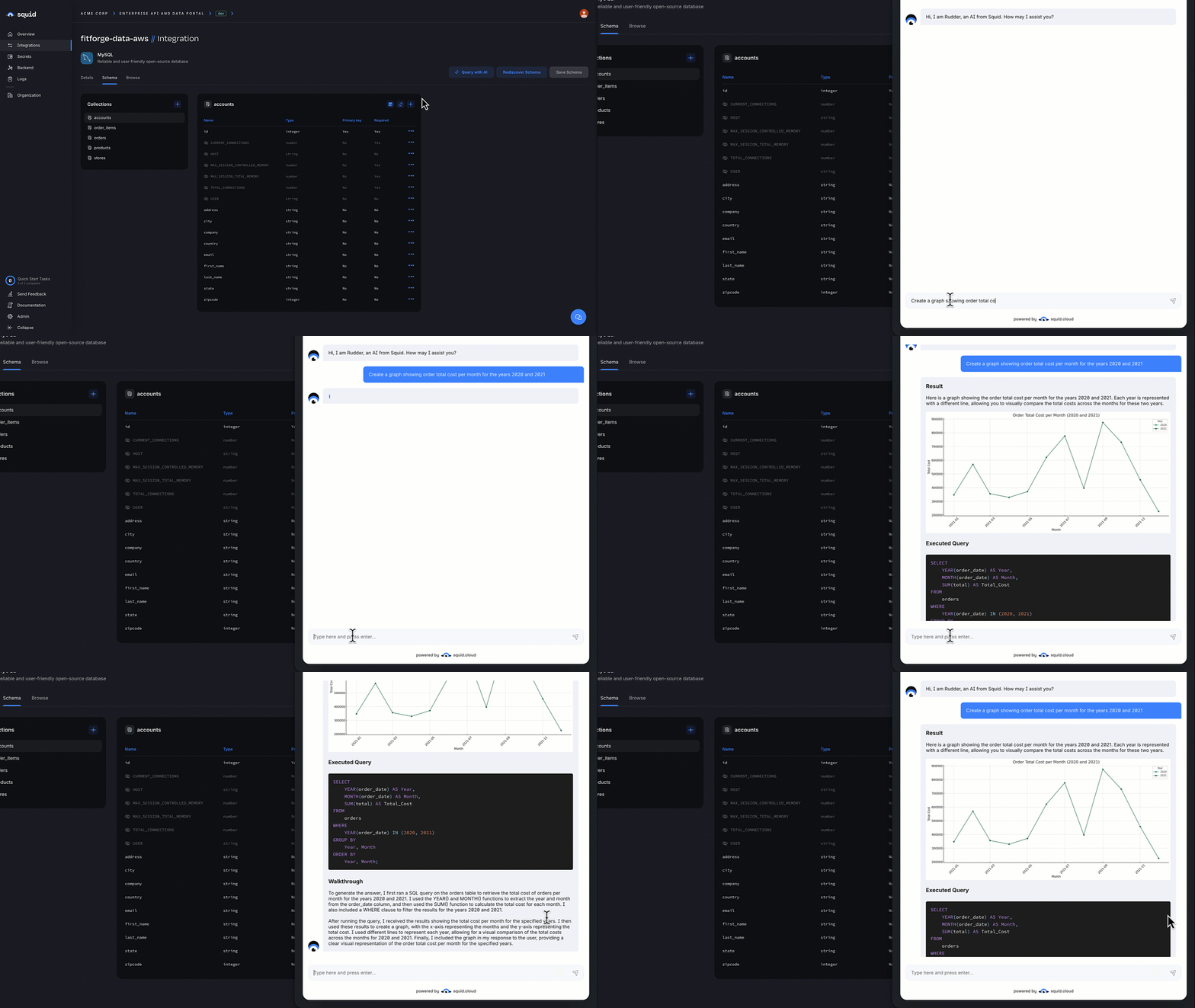
You don't need to write code to try out Query with AI. After your schema is configured, click Query with AI from the schema view in the Squid Console and ask your questions in plain English. This is the fastest way to iterate on schema descriptions.
Error Handling
Common errors
| Error | Cause | Solution |
|---|---|---|
UNAUTHORIZED | No @secureAiQuery(integrationId) rule returned true | Add a security rule that matches the integration and returns true for the calling user |
This integration cannot be used yet | The connector has no schema configured | Configure schema descriptions in the Squid Console |
Integration not found | The integrationId does not match any connector | Verify the connector ID in the Squid Console |
| Query syntax errors | Generated query is invalid for the database dialect | Squid retries automatically up to maxErrorCorrections times. Increase the limit if needed. |
| Mutation rejected | Generated query attempted a write (INSERT, UPDATE, DELETE, $out, $merge) | Query with AI is read-only by design. Restructure the prompt or use executables for writes. |
| Pipeline succeeded but answer is wrong | Schema descriptions are missing or misleading | Improve the collection and field descriptions in the Squid Console |
Inspect the executed query
When the answer looks wrong, the first thing to check is the actual query Squid ran. Log response.executedQueries and re-run the queries directly against the database to see what they returned.
- TypeScript
- Python
const response = await this.squid.ai().executeAiQuery('postgres', question);
for (const executed of response.executedQueries) {
  console.log(`Purpose: ${executed.purpose}`);
  console.log(`Query:   ${executed.query}`);
  console.log(`Success: ${executed.success}`);
}
response = await self.squid.execute_ai_query('postgres', question)
for executed in response.get('executedQueries', []):
    print(f"Purpose: {executed.get('purpose')}")
    print(f"Query:   {executed['query']}")
    print(f"Success: {executed.get('success')}")
Best Practices
- Invest in schema descriptions. Query with AI's accuracy depends almost entirely on the quality of collection and field descriptions. Vague descriptions produce vague queries.
- Always add a
@secureAiQueryrule. Without one, calls toexecuteAiQueryfor that integration are blocked. With a permissive one, anyone can read any data in the connector. Treat it like any other access control surface. - Use
collectionsToUseto scope queries. When users only need to ask about one area of the database, restricting the available collections speeds up the query and reduces the chance of hallucinated joins. - Apply rate limiting to AI query executables. Each call costs model tokens and database CPU.
- Cache by prompt for read-heavy use cases. Identical prompts often produce identical queries. Use client-side caching to avoid re-running them.
- Enable
validateWithAiOptionswhen you need an extra check on generated queries before they hit production data. - Turn on
enableRawResultswhen you need to render the data yourself (charts, tables, exports). The result file URL is included inexecutedQueries[].rawResult.
See Also
- Database connectors - Configure the data source for Query with AI
- Executables - Wrap
executeAiQueryso the client can call it - Security rules - Securing AI queries with
@secureAiQuery - AI agent - Build a full agent that uses Query with AI as a tool
- AI functions - Custom AI tools for use cases that need more than
executeAiQuery