Step 4: AI Agent Workflow を作成する
unique ability を持つ AI agent を customize し、完全な AI agent workflow を作成します
Agent Studio は、custom AI agent solution の構築を開始する最も迅速な方法です。この tutorial では、AI agent workflow を作成することで、この series の step 1、step 2、step 3 で習得した skill を発展させます。
構築するもの
- code を一切記述せず、自然言語で sample business data と interaction できる AI agent workflow。
必要なもの
- この tutorial は、最初の AI agent を作成する この series の step 1 および 2 で習得した skill を基にします。この tutorial を完了していない場合は、続行する前に完了してください。
- Squid Console の Squid account
新しい Agent を作成する
-
Squid Console で Agent Studio tab に移動します。
-
Create New Agent をクリックして agent を追加します。Agent ID と description の入力を求める window が表示されます。
- Agent ID:
workflow-agent。 - Description:
This is an agent for Squid AI's agent workflow tutorial
- Agent ID:
-
Create をクリックして agent を作成します。
agent を作成すると、新しい agent の Overview tab に redirect されます。
Agent に Instruction を指定する
agent に custom instruction を指定すると、unique persona を与えられます。
You are an expert assistant for an internal team at a homegoods business. You will answer questions about the homegoods business based on our data and your general knowledge.
Agent を Sample Database に接続する
次に、homegoods business の product、order、customer に関する information を含む sample database に agent を接続します。これにより、agent は提供された data に基づいて question に answer できます。
agent が database に query を実行して data を retrieve できるよう、database ability を追加します。
-
Agent Studio tab の agent Overview page で、page 右側の Add Abilities をクリックします。
-
Database ability をクリックし、Add New Database menu を dropdown します。scroll down して MongoDb を選択します。database connection を構成する screen が表示されます。この tutorial 用に Squid AI が pre-configure した以下の detail を入力します。
- Connector ID:
homegoods-business - Connection String:
mongodb+srv://homegoods.gxz0j4q.mongodb.net/homegoodsBusiness - Database Username:
read-only - Database Password: key を
mongodb-password、value をidmSZKR9Mxz90F2Mとする secret を作成します。 これらの detail を入力後、Test Connection をクリックして connection が成功することを確認します。connection が成功した場合は、Add Connector をクリックして続行します。
- Connector ID:
-
connector を追加すると、database の schema page に redirect されます。database schema は、query に使用可能な collection と field を含む database structure を記述します。AI agent が data structure をより正確に理解できるよう、database schema の description を提供することが重要です。
description を追加するには、Schema page の AI features button を dropdown し、Generate Descriptions を選択します。
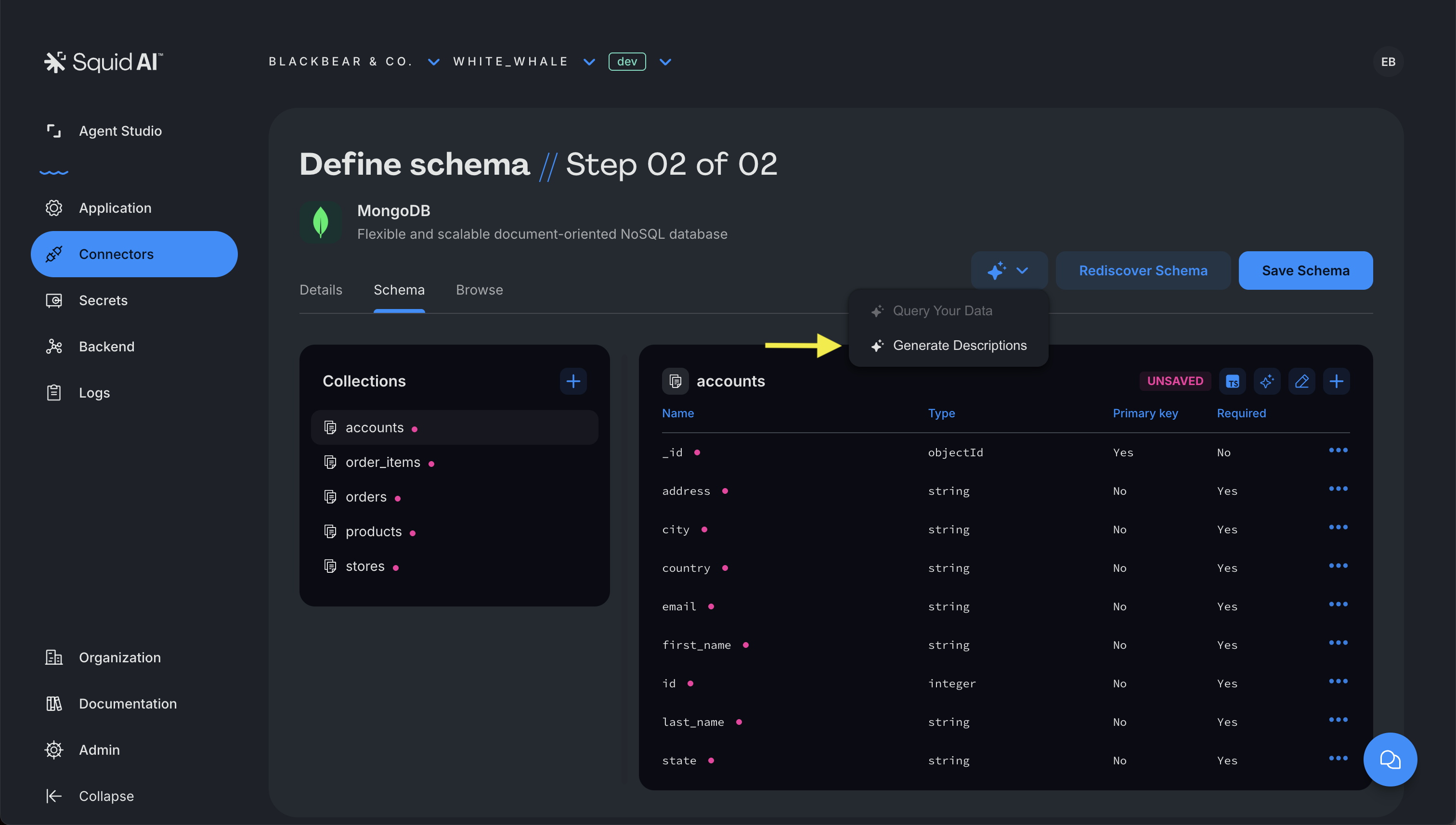
additional instruction pop-up に以下の instruction を追加します。次に Confirm をクリックします。description の生成後、Save Schema をクリックして変更を保存します。
All fields with a monetary value are in US dollars.
- Agent Studio をクリックし、
workflow-agentagent を選択して、agent Overview page に戻ります。- page 右側の Add Abilities をクリックします。
- Database ability をクリックし、+ symbol をクリックして、ID が homegoods-business の MongoDB connector を追加します。
- ability を使用するタイミング、agent が ability を使用する方法に関する instruction、database で query する specific collection を指定する field を持つ screen が表示されます。他の 2 つは空欄のままにして、When to use field に以下の value を使用します。
Call this connector whenever the user asks about our homegoods orders.
- Add connector をクリックして agent に ability を追加します。これで database ability を使用する準備ができました。
Agent の Capability を拡張する
各 agent には、agent の functionality を拡張するために追加できる built-in ability がいくつかあります。これらの ability には、knowledge baseと specialized AI functionが含まれます。この guide では、agent の ability list に 2 つの AI function を追加します。
- agent の Overview page で、page 右側の Add Abilities をクリックします。
- AI Functions section まで scroll down し、
createPdfFromHtmlを追加します。この ability により、agent は PDF を生成でき、report、insight、summary の作成に役立ちます。 - step 1 を繰り返して、2 つ目の AI function、
searchWebを追加します。この ability を使用して web の追加 knowledge で agent を augment します。これは database 内の data に直接関連しない question に answer する場合に役立ちます。
AI Agent Workflow
agent の 3 つの ability はすべて連携して custom AI agent workflow を作成します。table、chart、graph generation など、Squid AI の built-in feature により functionality が拡張されます。Test Agent tab で AI agent に送信する sample prompt は以下のとおりです。
1. Generate a PDF invoice for order ID 63572.
2. Who are some of our biggest competitors in the homegoods space?
3. Create a line graph of margin percentages for each product type throughout 2024.
4. Show me a table of customers who have placed multiple orders.
5. What percent of orders were placed online?
6. Create a stacked bar chart showing the value of orders each month in 2024 by order state.
7. Show me a chart of refunds as a percentage of total sales in each month of 2024 as a line and my total sales as a bars on that same graph.
「Create a PDF with a list of all orders with a total over 1000」や「Search the web for the cheapest available overnight shipping to the customer's address for order ID 17011」のように、複数 ability を組み合わせる test prompt を試してください。
AI agent を最も効果的に使用するには、各 ability の capability と limitation を理解することが重要です。たとえば、一部の data が database に存在しない場合や、AI agent が必要なすべての information に access できない場合があります。これらの場合、agent は question に answer できないことを示す response を提供します。
次のステップ
おめでとうございます!AI agent workflow を正常に作成しました。これで no code AI workflow を作成・customize する方法の基本を理解できました。
-
Agent Studio onboarding series の次の tutorial に進む: Coming soon...
-
高度に customized された AI agent workflow を構築したいですか? Squid SDK で custom agent を作成するか、hands-on learning experience のために AI tutorialを確認してください。technical developer 専用。
-
質問がありますか? お問い合わせください!開始を喜んでお手伝いします。