Adding authentication
Squid integrates with a variety of different authentication providers. By connecting them to Squid, you can authorize user actions and add security to your project.
Why use authentication
Most applications need to know who their users are and control what each user can do. Squid connects to your existing authentication provider so you can verify user identity and enforce access control without building an auth system from scratch.
Overview
Squid does not issue tokens. Instead, your authentication provider issues tokens, your client passes them to Squid, and Squid validates them and makes auth details available in your backend code.
Squid supports two authentication methods:
- Bearer tokens (user auth): Your auth provider issues a JWT for each user. The client sends this token with every Squid request. Squid validates the token and extracts user details (user ID, expiration, custom attributes). Use this for any feature where you need to know which user is making the request.
- API keys (server-to-server auth): A shared key that grants access without a user identity. Use this for backend-to-backend communication, admin scripts, or automated processes where user identity is not needed.
Supported providers
Squid supports the following authentication providers:
| Provider | Description | Docs |
|---|---|---|
| Auth0 | OpenID Connect provider | Auth0 setup |
| AWS Cognito | AWS user pool service | Cognito setup |
| Okta | Enterprise identity platform | Okta setup |
| Keycloak | Open-source identity management | Keycloak setup |
| Firebase Auth | Google Firebase auth | Firebase setup |
| Descope | No-code CIAM platform | Descope setup |
| JWT RSA | Custom RSA-signed JWTs | JWT RSA setup |
Most of the providers above use the OpenID Connect (OIDC) protocol, an identity layer built on top of OAuth 2.0 that standardizes how applications verify user identity and retrieve profile information. Understanding OIDC can help you configure your provider correctly and troubleshoot token issues. Learn more about it here.
Quick start
Prerequisites
- A Squid application (backend and client)
- An account with one of the supported auth providers listed above
Step 1: Add an auth connector in the Squid Console
Navigate to your application in the Squid Console and click Add auth provider on the application overview. Select your preferred connector and fill in the required configuration fields.
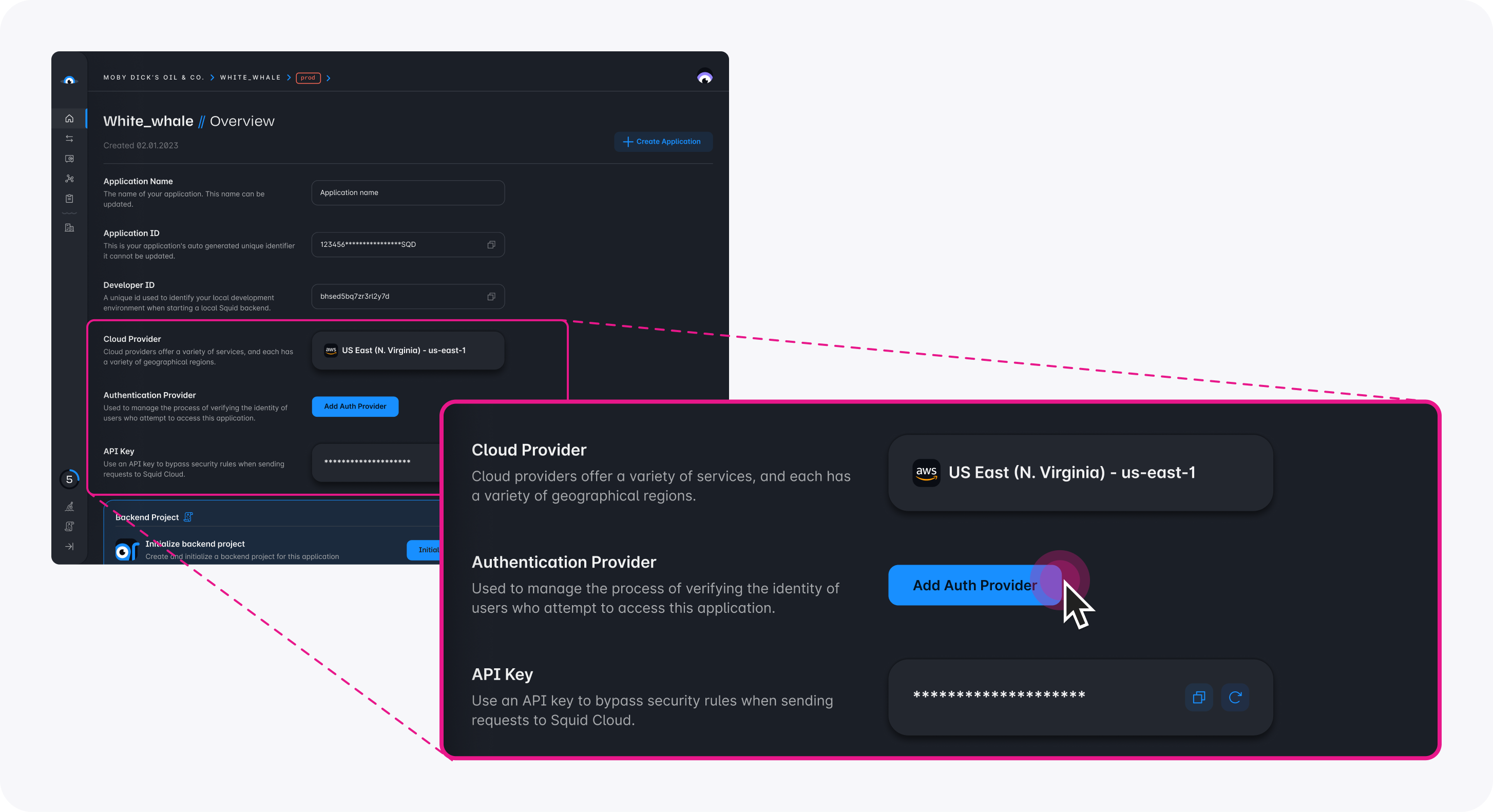
For provider-specific configuration details, see the individual provider pages linked in the Supported providers table above.
Step 2: Configure the client
After setting up the connector in the Console, configure your Squid client to send auth tokens with every request:
import { Squid, SquidAuthProvider } from '@squidcloud/client';

const squid = new Squid({ ... });

const authProvider: SquidAuthProvider = {
  // Must match the connector ID you set in the Squid Console
  integrationId: 'your_auth_connector_id',
  getToken: () => {
    // Return the token from your auth provider (e.g., Auth0, Firebase, Cognito)
    return yourAuthLibrary.getAccessToken();
  },
};

squid.setAuthProvider(authProvider);
Step 3: Use auth in your backend
With the auth provider configured, every request to your backend includes the validated token. You can access the authenticated user's details in any backend service method:
import { executable, SquidService } from '@squidcloud/backend';

class MyService extends SquidService {
  @executable()
  getProfile(): { userId: string } | null {
    const userAuth = this.getUserAuth();
    if (!userAuth) {
      return null;
    }
    return { userId: userAuth.userId };
  }
}
Client-side configuration
The SquidAuthProvider interface
The SquidAuthProvider interface defines how Squid retrieves auth tokens from your client:
interface SquidAuthProvider {
  /** Must match the connector ID configured in the Squid Console. */
  integrationId: string;

  /**
   * Returns a valid access token, or undefined if there is no active session.
   * Called by Squid every time the client makes a request to the backend.
   * Can be synchronous or asynchronous.
   */
  getToken(): Promise<string | undefined> | string | undefined;
}
integrationId- Must match the integration ID you configured in the Squid Console exactly.getToken()- Called on every request. Can return astring,undefined, or aPromisethat resolves to either. When the function returnsundefined, no authorization information is sent with the request.
You can set the auth provider either through the Squid constructor options or by calling setAuthProvider:
// Option 1: Set in the constructor
const squid = new Squid({
  appId: 'your_app_id',
  region: 'us-east-1',
  authProvider: {
    integrationId: 'auth0',
    getToken: () => getAccessToken(),
  },
});

// Option 2: Set after initialization
squid.setAuthProvider({
  integrationId: 'auth0',
  getToken: () => getAccessToken(),
});
Token caching
Since Squid calls getToken() for every request, cache the token and only renew it when it approaches expiration:
let cachedToken: string | undefined;
let tokenExpiry = 0;

const authProvider: SquidAuthProvider = {
  integrationId: 'auth0',
  getToken: async () => {
    const now = Date.now();
    // Renew the token 60 seconds before it expires
    if (!cachedToken || now >= tokenExpiry - 60_000) {
      const result = await yourAuthLibrary.getAccessToken();
      cachedToken = result.token;
      tokenExpiry = result.expiresAt;
    }
    return cachedToken;
  },
};
API key authentication
Use API key authentication for backend-to-backend communication, admin operations, or automated scripts where user identity is not required.
Pass the API key through the Squid constructor options:
import { Squid } from '@squidcloud/client';

const squid = new Squid({
  appId: 'your_app_id',
  region: 'us-east-1',
  apiKey: 'your_api_key',
});
API key authentication does not provide a userId. Use it only when you do not need to identify individual users.
You can find or recreate your Squid API key from the Application tab in the Squid Console.
Using auth in the backend
Auth helper methods
SquidService provides the following methods for working with authentication in your backend code:
| Method | Returns | Description |
|---|---|---|
isAuthenticated() | boolean | Returns true if the request has valid auth (user token or API key) |
assertIsAuthenticated() | void | Throws UNAUTHORIZED if the request is not authenticated |
getUserAuth() | AuthWithBearer | undefined | Returns user auth details when the request uses a Bearer token |
getApiKeyAuth() | AuthWithApiKey | undefined | Returns API key details when the request uses an API key |
Auth type shapes
When a request uses a Bearer token (user auth), getUserAuth() returns an AuthWithBearer object:
interface AuthWithBearer {
  type: 'Bearer';
  /** The unique identifier of the authenticated user. */
  userId: string;
  /** The expiration timestamp of the token, in seconds. */
  expiration: number;
  /** Additional attributes associated with the token. */
  attributes: Record<string, any>;
  /** The raw JWT token string, if available. */
  jwt?: string;
}
When a request uses an API key, getApiKeyAuth() returns an AuthWithApiKey object:
interface AuthWithApiKey {
  type: 'ApiKey';
  /** The API key string used for authentication. */
  apiKey: string;
}
Request context
Every backend method has access to this.context, which returns a RunContext object with information about the current request:
interface RunContext {
  /** Your application ID. */
  appId: string;
  /**
   * The ID of the client that initiated this request. Only available for
   * client-initiated requests (not triggers, schedulers, or webhooks).
   */
  clientId?: string;
  /** The IP address of the client that initiated this request. */
  sourceIp?: string;
  /** The headers of the request. Header keys are lowercase. */
  headers?: Record<string, any>;
}
Example: Authenticated backend method
import { executable, SquidService } from '@squidcloud/backend';

class UserService extends SquidService {
  @executable()
  getUserDashboard(): { userId: string; attributes: Record<string, any> } {
    // Throws UNAUTHORIZED if no valid auth is present
    this.assertIsAuthenticated();

    const userAuth = this.getUserAuth();
    if (!userAuth) {
      throw new Error('This endpoint requires user authentication, not an API key');
    }

    return {
      userId: userAuth.userId,
      attributes: userAuth.attributes,
    };
  }
}
Connecting auth to security rules
Authentication data feeds directly into Squid's security decorators (@secureDatabase, @secureCollection, and others). Security rules use the same auth methods described above to control access to your data and APIs.
For example, you can require authentication for all operations on a collection:
import { secureCollection, SquidService } from '@squidcloud/backend';

class SecurityService extends SquidService {
  @secureCollection('users', 'read')
  secureUsersRead(): boolean {
    return this.isAuthenticated();
  }
}
For full coverage of security decorators and patterns, see the Security rules documentation. For role-based access patterns, see the RBAC documentation.
Error handling
When authentication fails, Squid returns a 401 UNAUTHORIZED response. Common causes include:
- Expired tokens: The token returned by
getToken()has passed its expiration time. Implement token caching with renewal as shown in the Token caching section. - Mismatched integration ID: The
integrationIdin yourSquidAuthProviderdoes not match the integration ID configured in the Squid Console. Verify both values match exactly. - Missing auth provider setup: The auth connector has not been added in the Squid Console, or it is misconfigured (wrong domain, client ID, etc.).
- No token returned: The
getToken()function returnsundefined, so no auth information is sent with the request. Confirm that the user is signed in before making authenticated requests.
To debug authentication issues, verify that:
- The connector is configured correctly in the Squid Console.
- The
integrationIdpassed tosetAuthProvidermatches the Console integration ID exactly. - The
getToken()function returns a valid, non-expired token.
Best practices
- Cache tokens in
getToken()and renew them shortly before expiration to avoid unnecessary round trips to your auth provider. - Always check
isAuthenticated()in your security rules as a baseline requirement before granting access to any resource. - Use Bearer tokens for user-facing features and API keys for backend services or scripts.
- Secure all entry points including databases, APIs, storage, and queues. An unsecured entry point bypasses your auth checks.
- Use
assertIsAuthenticated()to fail fast with a clear error instead of manually checking and throwing.